
Android build · 40 MB · version notes
Where does the file come from? The Playinmatch99 desk, in a chat, one link at a time. No Indian store listing sits behind this brand and the desk has never pretended one does, which is also why a single build gets searched four different ways: playinmatch apk, playinmatch install, playinmatch download apk, playinmatch app download apk. One file, four typing habits.
So the page runs in order: what the file actually is, the five install steps, what Android asks you for, how room and permissions work, the version problem, iPhone, and the tells of a fake build. Nothing here needs a laptop.
Playinmatch App Download — What the Official Android File Really Contains
Nothing exotic, which is worth saying early. The Playinmatch99 build is a wrapper — the same lobby a browser would open, packed behind an icon so the address bar drops out of your life. Same account, same balance, same markets. Sign in on the app at four in the afternoon, open the site at nine that night, and you are looking at one account rather than two.
Two things the wrapper adds, both practical rather than flashy. Your session survives closing the phone, so Playinmatch99 does not throw you back at the login box every time the screen locks and you walk off to make tea. And a followed market can send you a nudge when it goes in-play, which is the honest reason most regulars bother with the file at all.
Size and requirement, since those are the two lines people came for: the Playinmatch99 file weighs roughly 40 MB and wants Android 9.0 or newer. Any handset from around 2019 onward will run it comfortably. Older than that and the install either refuses outright or the app opens and then behaves badly, which is the worse of the two outcomes.
Data and battery come up often enough to answer here. Playinmatch99 wraps a web lobby, so the app costs you roughly what the browser costs you: light while you are reading prices, heavier the moment a live table starts streaming in front of you. Across a long cricket evening on mobile data that gap is noticeable. On wifi nobody has ever mentioned it to the desk.
What it is not is a separate product. There is no second account, no second balance, no parallel set of prices — one Playinmatch99 ID covers the app and the browser, and moving between them costs you a tap. The absent store listing is not the red flag it looks like either. Exchange apps reach Indian phones as direct files; that is simply the route. It does mean the desk is the only source worth using, and that point will come back twice more before this page ends.
Install the Playinmatch APK in Five Clear Steps
Read the five lines below before you start. On a decent connection the whole thing is over in less then a minute, and only step three asks anything of you.
- Ask the Playinmatch99 desk for the current Android file and tap the link it sends. Around 40 MB drops into your Downloads folder.
- Open the file from the notification shade. Swiped it away already? Downloads in the file manager has it, sitting at the top of the newest-first list.
- Android stops once and asks whether this browser may install apps. Approve it. This is the single unknown-sources prompt the Playinmatch99 install needs, and the permission goes to the browser, not to the file.
- Installation runs by itself. Thirty seconds on most phones, less on anything recent.
- Open the icon and sign in with your Playinmatch99 username and password. No ID yet? The desk opens one in about four minutes, and you can ask for it while the download is still running.
Step three is where people bail out and go back to Google, so let me sit on it. The prompt reads as a warning because Android words every such prompt as a warning; what it means is that the system did not vet this file, not that the file is dangerous. You would see identical wording installing anything from outside a store. Grant it once and it stays granted for that browser — a future Playinmatch99 update will not ask again.
Two things go wrong at this stage, and both have dull fixes. When Android answers with "App not installed", there is usually an older Playinmatch99-branded file already sitting on the phone from some other source; remove that one first, then run this install again. When the download stalls at ninety-something percent, the file is fine and the connection is not. Pull it fresh on a stable network instead of resuming, because a half-written 40 MB file installs into nothing useful.
First screen after the install is the lobby, opened on in-play. The casino half keeps its own tab, and these four are the tiles people tap first:
 Poker
 Fishing
 Lightning Dice
 Sic Bo
Tap any of them and the round is already running — studio feeds keep their own clock whether or not you have staked. The sports side of Playinmatch99 behaves differently, with back and lay prices that move as money arrives. Playinmatch game walks the lobby properly.
Playinmatch App for Android — Storage, Permissions and Safe Defaults
Forty megabytes is the download, not the space you need. Give the phone a couple hundred megabytes of headroom, because Android unpacks the file during installation and a handset sitting at ninety-nine percent full will fail the install with a message that explains nothing. Clear a few videos. That is usually the entire fix.
Permissions stay thin. Beyond the one install approval, the only prompt most people meet is the notification request, and that turns up the first time Playinmatch99 wants to tell you a market went in-play. Say no to it and the app still works; you simply lose the nudge, which was half the reason for installing.
One quiet annoyance worth knowing about. Android battery optimisation puts background apps to sleep after a while, and when the Playinmatch99 nudges go silent a fortnight after install, that sleep setting is the usual culprit rather than the build. Whitelist the app in battery settings and they come back.
What the Playinmatch99 Build Asks For
- Install approval — once, granted to the browser
- Notifications — optional, for in-play alerts
- Storage — the download itself, nothing more
- Never — contacts, SMS, call log, gallery
Anything asking for that last row is not the Playinmatch99 file. Uninstall it and start again.
Playinmatch APK Latest Version and the Fortnight Check That Keeps Yours Current
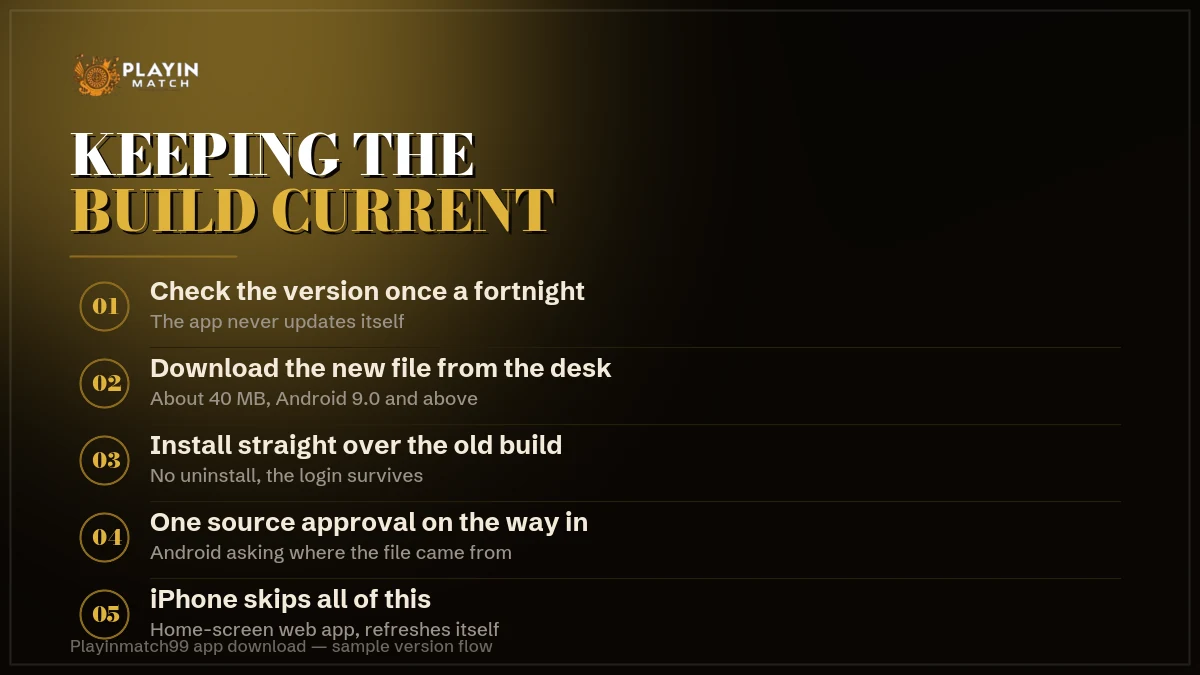
Here is the line that catches everyone: there are no automatic updates. Play Store apps quietly refresh themselves overnight and you never think about it. A direct file does not, so the build sitting on your phone today is the build you installed, however many months ago that was.
Replacing it is undramatic. You download the new Playinmatch99 file and install it straight over the old one — nothing gets uninstalled first, the the icon stays where it was, your login stays valid, and the new version simply takes the old one's place. Thirty seconds, same as the first time.
| What you notice | Latest Playinmatch99 build | Build from months back |
|---|---|---|
| Market list | Current fixtures and session lines | Newer markets missing |
| Live tables | All tiles open | Some tiles fail to load |
| Deposit route | Handle the desk quotes today | Can point at a retired one |
| In-play alerts | Working | Can go quiet |
| Update method | Install over the old file | Install over the old file |
How often should you check? Once a fortnight covers it, and the check costs nothing — ask the desk whether the file you are on is current. If the Playinmatch99 lobby has started doing something odd on your phone but works fine in a browser, you have your answer without asking anybody.
Searches for an old version split into two camps. One is people on an ageing handset who found a newer build sluggish and want the previous one back, which is at least a real problem with a real reason behind it. The other is people who have read somewhere that an older release pays differently or behaves differently. It does not. The build is a window onto the same Playinmatch99 room; the window cannot change what is in the room.
Changing handsets needs no help from anybody. Install the current Playinmatch99 file on the new phone, sign in with the same username, and your balance is exactly where you left it, because the account lives on the server and never on the device. The old phone keeps a dead icon until you delete it.
Mirror listings are the other half of this question — the uptodown-style pages that surface when somebody searches for the latest version. They are not automatically hostile. They are copies, and copies age: a mirror hands out whatever build it was given, whenever it was given it. The desk file is the original. A mirror is a photograph of one, taken at an unknown date.
Playinmatch Download on iPhone — the Quick Home-Screen Route
iPhone has no file. No APK, no TestFlight invitation, no hidden store page — and anyone offering you one is offering you something else entirely. The Playinmatch99 route on iOS is the mobile address saved to the home screen, which takes about fifteen seconds.
The four taps are listed in the plate beside this, so here are the two things that plate cannot tell you. It has to be Safari: Chrome on an iPhone buries the option somewhere else, and most people who report that the trick does not work were simply in the wrong browser. Once the icon is sitting there, it behaves like an app — no address bar, no tabs, the same Playinmatch99 login, the same markets, the same payout route.
What you give up is the in-play nudge. That one lives in the Android build, and iOS has nothing to swap in for it.
Address details for phones: Playinmatch com mobile.
Playinmatch99 on iPhone, in Four Taps
- Open the Playinmatch99 address in Safari
- Tap share on the bottom bar
- Choose Add to Home Screen
- Rename, tap Add, done
Six Tells of a Fake Playinmatch APK Download, and the Genuine File
Fake builds exist because the search volume is worth chasing. Someone repacks an installer, names it after the brand, and waits for a person in a hurry. They are not sophisticated, though, and six tells give them away before you ever tap install. Run through the list occassionally even on a file you trust.
- Wrong weight. A 6 MB download or a 180 MB one is not the Playinmatch99 build. Forty megabytes, give or take a little.
- Greedy permissions. Contacts, SMS, call log. The real Playinmatch99 file has no use for any of them, and an APK that wants your messages wants your one-time passwords.
- A card field at sign-in. Playinmatch99 login takes a username and a password. A build asking for card details on the first screen is harvesting, not logging in.
- Mod, hack or predictor labels. Nothing installed on a phone changes a result settled on a server. These builds sell that lie and carry something nastier underneath.
- A promised store page. There is no Playinmatch99 listing in India, so a link that swears it will take you to one is already lying about something checkable.
- A near-miss name or icon. An extra letter, a swapped digit, an icon that looks almost right at thumbnail size. Zoom in before you tap.
Already installed something that fits two or three of those? Uninstall it first, then message the Playinmatch99 desk and change your password from a different device. Do it in that order. The desk handles resets around the clock and will not ask you to pay for one — anybody who does is running the second half of the same scam.
After the Playinmatch Install — Free ID, UPI Deposits and Fast Payouts
The file is on the phone. What happens next is the same on the app as it is anywhere else, so this part is short.
If you do not hold an account yet, the Playinmatch99 desk opens one from three details — a username you want, your mobile number, and a password you will actually remember. Roughly four minutes on a normal afternoon, longer during an India match because the same desk is answering deposit questions at the same time. Nothing is asked of you in documents at this stage.
Deposits run over UPI and start at 100. You send to the handle the desk gives you at that moment, pass back the reference, and the balance moves. Withdrawals go the other way through an approval queue first, then the bank leg, and twenty to sixty minutes after approval is the normal window. Late on a Sunday it stretches. The one thing that genuinely stalls a Playinmatch99 payout is a name mismatch between the account and the bank account — sort that out on day one, not on the night you need the money.
Payout timings in detail: Playinmatch withdrawal · sign-in errors: Playinmatch login.
Playinmatch App Download FAQ — Real Answers on the File and Its Versions
How do I download the Playinmatch app on Android?
Ask the Playinmatch99 desk for the current Android file and tap the link it sends. About 40 MB lands in Downloads. Open it, approve the one prompt about installing from this browser, and the install finishes in around thirty seconds. Then sign in with your existing username and password.
Is the Playinmatch APK safe to install?
The file from the Playinmatch99 desk is the one to use, and it asks for nothing beyond the install approval and optional notifications. Repacked copies are the actual risk. Treat wrong file size, permission requests for contacts or SMS, and any mod or hack label as reasons to delete the download.
How do I update to the Playinmatch APK latest version?
Download the newer Playinmatch99 file and install it straight over the old one. Nothing needs uninstalling, the icon stays put and your login still works. There are no automatic updates on a direct file, so check with the desk about once a fortnight if the app starts behaving oddly.
Can I download the Playinmatch app on iPhone?
There is no iPhone file at all. Open the Playinmatch99 mobile address in Safari, tap share, choose Add to Home Screen, and the icon opens the lobby without browser chrome. It must be Safari; Chrome on iOS hides that option. Everything except the in-play notification works the same way.
Playinmatch App Download and the Searches Around It, Row by Row
- Playinmatch app download
- The official Playinmatch99 route on Android: one direct file of about 40 MB for Android 9 and up, installed after a single source approval. The same file answers playinmatch apk, playinmatch install, playinmatch download, playinmatch download apk, playinmatch apk download and playinmatch app download apk.
- Version questions
- Four phrasings, one file. Playinmatch apk latest version and playinmatch live apk both point at the build the desk is handing out this week. A search for playinmatch app download apk old version almost always comes from somebody on a 2018 handset who wants the previous release back. Playinmatch apk latest version uptodown lands on a mirror listing, which carries a dated copy rather than the desk file.
- Phones and addresses
- Nothing installs on an iPhone. Safari saves the playinmatch com mobile address to the home screen and playinmatch com mobile login then wants the same username and password the browser wants. Only playinmatch app for android involves a file at all.
- Inside the app
- The Playinmatch game lobby carries playinmatch com slots, a live Playinmatch casino with poker, Sic Bo and Lightning Dice, and Playinmatch aviator on the crash side. Playinmatch online live sports sits in the in-play tab, where playinmatch 99 regulars spend most of their time.
- Money and help
- UPI deposits from 100; playinmatch withdrawal time runs twenty to sixty minutes after approval. Playinmatch customer care number india 24/7 reaches the desk at any hour, and is playinmatch safe comes down to using an address you already trust rather than one a stranger sent.